Most AI teams begin with a simple RAG setup. It works fine at first, but things change when the system starts handling more users, larger datasets, and complex questions. Sometimes it pulls the wrong information. Other times, it misses useful context or gives answers that don’t quite make sense. This is where exploring different types of RAG becomes important. One setup may work for a basic chatbot, but not for every AI application.
So, what are the types of RAG? They include Naive RAG, Advanced RAG, Modular RAG, HyDE, Adaptive RAG, Corrective RAG, Graph RAG, Agentic RAG, and more. This guide explores 14 types of RAG, how they work, and when to use each one.
Why Do AI Applications Need Different Types of RAG?
Not every AI application works with the same kind of data or handles the same questions. A basic chatbot may only need simple document retrieval, while an enterprise system may need to search multiple databases and handle complex queries.
Different types of RAG help address these needs:
- Better retrieval: Find more relevant information from large knowledge bases.
- Complex queries: Handle questions that need multiple searches or connected information.
- Data flexibility: Work with text, images, tables, audio, and other formats.
- Improved accuracy: Check retrieved information before generating answers.
- Scalability: Manage growing datasets and information spread across different sources.
The right approach depends on your application’s requirements, data, and expected performance.
14 Types of RAG Architectures Explained
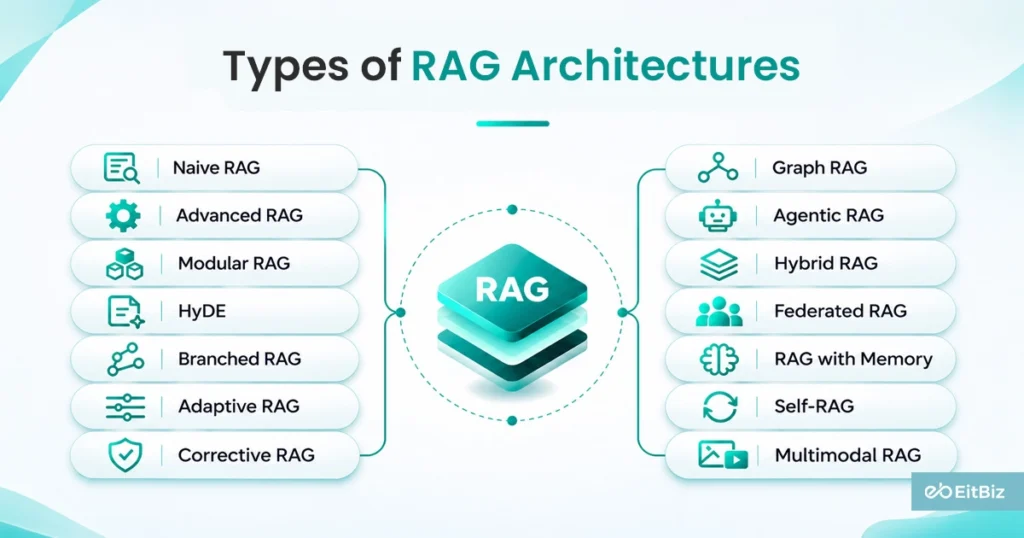
RAG comes in several forms, and each handles information retrieval a little differently. We’ve arranged these RAG types from simpler setups to more advanced ones, covering all types of RAG you’ll likely come across when building RAG applications.
1. Naive RAG (Simple RAG)
Naive RAG is the most basic approach to retrieval-augmented generation. When a user asks something, the system searches its connected knowledge base and retrieves a few relevant text chunks. These chunks go to the LLM along with the original question, helping it generate an answer using that information. Many teams start with this approach because it’s easy to build, but it can struggle as queries become more complex.
Best for: Building basic RAG chatbots for businesses, internal knowledge search, and small applications where users mostly ask simple, direct questions.
Limit: It can retrieve unrelated information or miss important context, leading to incomplete or inaccurate answers.
2. Advanced RAG
Advanced RAG improves the basic retrieval process by adding extra steps before information reaches the LLM. It may rewrite user queries, improve document chunking, or rerank retrieved results to find better matches. These changes help the system understand what the user actually needs and retrieve more useful information.
For teams building larger applications, advanced retrieval techniques can make a noticeable difference in answer quality.
Best for: Business knowledge bases, customer support systems, and applications that need accurate answers from large document collections.
Limit: Additional retrieval steps increase system complexity, processing time, and development costs.
3. Modular RAG
Modular RAG takes a different approach by breaking the retrieval process into smaller, independent components. Each component handles a specific task, such as searching documents, filtering results, reranking information, or generating answers. Teams can then adjust or replace these components without rebuilding the entire system.
This makes it easier to experiment with different retrieval methods as application needs change. It also allows developers to combine multiple techniques within the same RAG pipeline.
Best for: Complex AI applications that need flexible retrieval workflows and frequent changes to individual components.
Limit: Managing multiple components can make development, integration, and maintenance more difficult.
4. HyDE (Hypothetical Document Embeddings)
Sometimes, users ask short or unclear questions, making it difficult for a RAG system to find the right information. HyDE tries to solve this by first asking the LLM to generate a hypothetical answer or document based on the query. The system then converts that generated text into an embedding and uses it to search the knowledge base.
Since the search now has more context, it may find relevant documents that a direct query would miss.
Best for: Applications dealing with vague questions, short queries, or searches where users don’t use the same terms as the source documents.
Limit: The hypothetical text may contain incorrect details, which can lead to poor retrieval results if not handled carefully.
5. Branched RAG
Branched RAG handles a query by splitting it into smaller parts and sending them through separate retrieval paths. Each branch looks for information from a different source or focuses on a specific part of the question.
Once the results come back, the system combines them before sending the collected context to the LLM. This is useful when a single search isn’t enough to cover everything a user wants to know.
Best for: Applications that handle multi-part questions and need information from multiple documents or knowledge sources.
Limit: Running several retrieval paths can increase processing time and make result merging more difficult.
6. Adaptive RAG
Not every question needs the same amount of searching, and Adaptive RAG works around this idea. It first checks the user’s query and decides how much retrieval is actually needed.
For a simple question, it may use a basic search, while a complex one can trigger multiple retrieval steps or additional checks. This way, the system adjusts its retrieval process based on the query instead of following the same path every time.
Best for: AI applications handling a mix of simple and complex queries, where retrieval needs can change from one question to another.
Limit: The routing process adds another layer of complexity and depends on how accurately the system classifies queries.
7. Corrective RAG (CRAG)
Sometimes, a RAG system retrieves documents that look relevant but don’t actually answer the user’s question. Corrective RAG (CRAG) tries to catch this problem before the LLM generates a response. It uses an evaluator to check the quality of retrieved information and decide what happens next.
If the results are weak, the system can search again, use another source, or remove irrelevant content. This extra check helps reduce the chances of generating answers from poor-quality information.
Best for: Applications where answer accuracy matters, especially business knowledge bases, research tools, and customer support systems.
Limit: The evaluation and correction steps add processing time and may increase the overall cost of each query.
8. Self-RAG
Self-RAG gives the language model a more active role in checking its own responses. Instead of retrieving information for every query and generating an answer straight away, the model decides when retrieval is needed and whether the collected information is useful.
It also checks if the generated answer is supported by the retrieved sources. If something doesn’t look right, it can retrieve more information or revise its response. This makes the process more controlled, especially when accuracy matters.
Best for: Research assistants, enterprise knowledge systems, and applications where answers need to stay closely connected to reliable sources.
Limit: Self-evaluation adds complexity and doesn’t guarantee that the model will always identify incorrect or unsupported information.
9. RAG with Memory
A basic RAG setup may treat each query as a separate request, which can make longer conversations feel disconnected. RAG with Memory addresses this by storing useful information from earlier interactions and bringing it back when needed.
So, when a user asks a follow-up question, the system can use previous conversations along with its external knowledge base to generate a more relevant answer. This helps the AI maintain context instead of starting from scratch every time.
Best for: AI chatbots, personal assistants, and customer support systems that need to remember user preferences or previous interactions.
Limit: Storing and retrieving past information requires careful memory management, especially when dealing with outdated or sensitive data.
10. Hybrid RAG
Sometimes, a single search method isn’t enough to find the right information. Hybrid RAG solves this by combining keyword-based search and vector search in the same retrieval process.
Keyword search finds documents containing specific terms, while vector search looks for information based on meaning, even when the exact words don’t match. The system then combines and ranks the results to find the most relevant information before sending it to the LLM.
Best for: Enterprise RAG search, document-heavy applications, and knowledge bases where users search using both specific terms and natural language.
Limit: Combining results from different search methods requires extra configuration and ranking, which can increase processing time.
11. Federated RAG
In large organizations, useful information is often spread across different departments, databases, and systems. Federated RAG helps bring these sources together without moving all their data into one central location. When a user asks a question, the system searches the relevant sources separately and combines the retrieved results to generate an answer.
This allows teams to access information across different data environments while keeping control over where their data lives. It also makes data access and security controls important parts of the setup.
Best for: Large enterprises with distributed databases, separate departments, or strict data access requirements.
Limit: Connecting multiple data sources and managing permissions across them can make the system harder to maintain.
12. Graph RAG
Traditional RAG mainly focuses on finding relevant text, but sometimes the answer depends on how different pieces of information are connected. Graph RAG uses a knowledge graph to store relationships between people, places, products, and other entities.
When a query comes in, it searches these connections along with relevant information to build a more complete answer. This makes it useful for questions that involve multiple entities or require understanding relationships across different documents.
Best for: Enterprise knowledge management, financial research, and applications that need to answer complex questions involving connected information.
Limit: Building and maintaining knowledge graphs takes extra effort, especially when working with large or frequently changing datasets.
13. Agentic RAG
Unlike traditional RAG, which usually follows a fixed retrieval process, Agentic RAG gives AI agents more control over how information is collected. The agent first understands the user’s request and then decides which sources to search, what tools to use, and whether more information is needed.
It can also review retrieved results and repeat the search if the available context isn’t enough. This makes the retrieval process more flexible, especially when dealing with questions that need multiple steps.
Best for: Complex research tasks, enterprise workflows automation, and AI applications that need multi-step reasoning and information gathering.
Limit: Agent-based decisions can increase latency, API costs, and system complexity, particularly when several retrieval cycles are involved.
14. Multimodal RAG
Most basic RAG systems work with text, but real-world data isn’t always available in that format. Multimodal RAG extends retrieval to images, audio, videos, charts, and other content types. When a user asks a question, the system can search across these different formats and bring together the relevant information before generating an answer.
For example, it could retrieve details from a product image and combine them with information from a related document. This gives AI applications a way to work with more than just text-based knowledge.
Best for: Applications that need to search across mixed data, such as healthcare records, product catalogs, technical documents, and video libraries.
Limit: Processing different data formats requires specialized models and additional storage, which can increase development costs and system complexity.
So, these are the 14 major types of RAG used across different AI applications. Each has its own strengths and limitations, and the right choice depends on your data, use case, and system requirements. You can also combine different approaches to build a RAG system that better fits your application’s needs.
Naive RAG vs Advanced RAG vs Agentic RAG
Although all three approaches use external information to generate answers, they handle retrieval quite differently. Naive RAG follows a basic search-and-generate process, Advanced RAG adds extra steps to improve search quality, while Agentic RAG gives AI agents more control over the entire process. Here’s how they compare.
| Comparison | Naive RAG | Advanced RAG | Agentic RAG |
|---|---|---|---|
| Retrieval flow | Direct search followed by answer generation. | Uses query rewriting, reranking, and retrieval improvements. | Agents decide when, where, and how to retrieve information. |
| Cost | Low, with fewer processing steps. | Moderate, due to additional retrieval operations. | Higher, especially when multiple agent calls are involved. |
| Latency | Generally low. | Moderate, depending on retrieval steps. | Usually higher due to multiple reasoning and retrieval cycles. |
| Complexity | Easy to build and maintain. | Requires more tuning and configuration. | More complex, with agent orchestration and tool integration. |
| Main failure mode | Retrieves irrelevant or incomplete information. | Poor query processing or reranking can affect results. | Incorrect agent decisions or unnecessary retrieval loops. |
One thing worth remembering is that Simple RAG and Naive RAG usually mean the same thing in most scenarios. The main difference between these approaches comes down to how much control and processing they add to the retrieval process. The right choice depends on your application’s complexity, accuracy needs, and available budget.
Types of RAG Models and Components in an LLM Pipeline
The RAG types discussed above may follow different retrieval approaches, but most of them rely on a few common components. These components work together at different stages, starting with finding relevant information and ending with generating an answer.
Let’s look at the main components and understand how they fit into an LLM development pipeline.
- Retriever: Finds relevant information from the knowledge base using dense (vector), sparse (keyword), or hybrid search. These are the main retrieval methods used across different types of RAG models.
- Reranker: Works after the initial retrieval step. It reorders the results based on relevance so the LLM receives more useful context.
- Evaluator or Router: Checks retrieval quality or decides which retrieval path to follow. It plays an important role in Corrective RAG and Adaptive RAG.
- Generator: Uses the retrieved information to create the final response. Large LLMs suit complex tasks, while smaller models work well for simpler queries at lower costs. The right types of RAG LLM depend on your application’s requirements.
How to Choose the Right Type of RAG
With so many types of RAG available, choosing one can get confusing. The best approach is to start with what your application needs and identify where your current retrieval process falls short. Here are a few ways to make that decision easier.
- Start with Naive RAG: If you’re building your first RAG application, begin with a simple setup. Test its performance and identify retrieval problems before adding more components.
- Frequent Hallucinations: If the system generates answers from irrelevant information, consider Corrective RAG or Self-RAG to check retrieved content and improve answer quality.
- Vague or Short Queries: Use HyDE or Adaptive RAG when users ask unclear questions or provide very little context.
- Complex Questions: For queries involving multiple steps or relationships between entities, Graph RAG or Agentic RAG can help retrieve connected information.
- Mixed Data Formats: If your knowledge base contains images, tables, audio, or videos, Multimodal RAG is a better fit than text-only retrieval.
- Distributed Data: When information is spread across departments or security zones, Federated RAG can retrieve data from separate sources while respecting access controls. For more on protecting these systems, see our guide to RAG security risks and how to build a secure RAG system.
- Combine Approaches When Needed: You don’t have to stick to one architecture. For example, Adaptive RAG can route queries while Corrective RAG checks the retrieved results.
Emerging Types of RAG to Watch in 2027
As RAG technology continues to develop, researchers are exploring new ways to make retrieval faster, handle larger datasets, and improve security. Here are four emerging approaches worth watching as AI applications move towards 2027.
Long-Document RAG
This approach focuses on finding useful information across lengthy documents without losing important context. It can be useful for legal contracts, research papers, and large technical reports.
Predictive Prefetching RAG
Instead of waiting for a query, the system predicts what information might be needed next and retrieves it in advance. This can help reduce response delays.
Bidirectional RAG
This approach explores information flow between retrieval and generation, allowing both stages to work more closely together. The Bidirectional RAG research explores this direction.
Security-Focused RAG
This approach focuses on protecting knowledge bases from corpus poisoning, where attackers insert misleading information to influence AI responses.
Conclusion
There are several types of RAG, and each solves a different retrieval challenge. The right choice depends on your application, the kind of data you’re working with, and the level of accuracy you need. You don’t always need a complex setup, either. Start with a basic approach, measure where it falls short, and add more components only when needed. This way, you can build a RAG system that’s easier to manage and improve over time.
Looking to build or improve your RAG solution? Talk to EitBiz’s AI engineering team to explore the right approach for your business.