Imagine opening an app, and it already knows what you want next, before you do.
Today, artificial intelligence in mobile apps isn’t futuristic; it’s reshaping experiences at lightning speed.
According to recent research, 60-70% of mobile apps now incorporate AI or machine learning features like personalization and predictive analytics, with thousands of apps adding AI capabilities every year.
Here’s another eye-opening statistic: mobile apps that use AI for personalization and engagement can boost retention rates by up to 86% compared to those that don’t.
But with all this momentum comes a natural question: How do leading teams actually implement AI so it delivers real value, not just hype?
Many companies now recognize that simply tagging “AI-powered” isn’t enough; users expect intuitive, helpful, and contextually aware experiences. Yet, executing effective AI integration in mobile apps remains a challenge for most teams.
This guide goes beyond buzzwords to answer what successful AI app integration truly looks like, how it works, why it matters, and how to do it right in AI-powered mobile apps today.
What Is AI Integration in Mobile Apps?
AI integration in mobile applications refers to embedding artificial intelligence technologies, such as machine learning, natural language processing, and predictive analytics, into a mobile application so it can analyse data, learn from user behaviour, and make real-time decisions. Unlike traditional apps that follow fixed logic, AI-enabled apps adapt as users interact with them. This allows the app to deliver personalized content, intelligent recommendations, automated support, and predictive features that improve with continued use.
In simple terms, AI integration enables a mobile app to:
- Understand user behavior and preferences
- Learn from historical and real-time data
- Make decisions without constant manual updates
- Improve accuracy and performance over time
Core Types of Artificial Intelligence Used in Mobile Apps
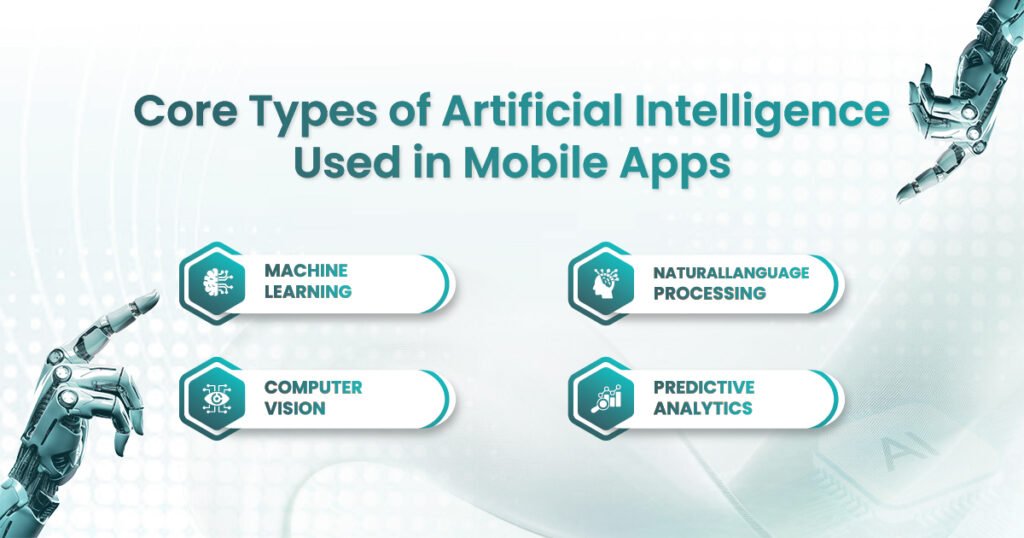
Understanding AI integration in mobile apps starts with identifying which type of intelligence your app actually needs. AI is not a single technology; it’s a combination of specialized systems designed to solve different problems. Choosing the right AI capability ensures better performance, lower costs, and meaningful user impact rather than unnecessary complexity.
Below are the core types of artificial intelligence in mobile apps and how they are applied in real-world scenarios.
1. Machine Learning (ML)
Machine Learning is the most widely used form of AI in mobile applications. ML models analyze historical and real-time data to identify patterns, learn from user behavior, and make data-driven decisions without explicit programming. The more data the app processes, the more accurate its outputs become over time.
In AI-powered mobile apps, machine learning enables personalization at scale. It helps apps move beyond generic experiences by adapting to individual user preferences, usage habits, and interaction history.
Machine Learning is commonly used for:
- Recommendation engines that suggest products, videos, or content based on user behavior
- User behavior analysis to understand engagement patterns and optimize UX
- Dynamic pricing models that adjust prices based on demand, location, or behavior
- Predictive search that anticipates what users are looking for before they finish typing
ML forms the backbone of most successful AI app integration strategies.
2. Natural Language Processing (NLP)
Natural Language Processing allows mobile apps to understand, interpret, and respond to human language, both written and spoken. NLP bridges the gap between how users communicate and how systems process information, making interactions more intuitive and conversational.
In AI in mobile app development, NLP plays a key role in improving accessibility and customer support. It enables apps to handle complex user queries without human intervention while maintaining context and intent.
NLP is widely used for:
- Chatbots that provide instant, accurate responses to user questions
- Voice assistants that enable hands-free navigation and commands
- Sentiment analysis to understand user emotions from text or feedback
- Search intent recognition that delivers more accurate and relevant results
When implemented well, NLP reduces friction and significantly improves user satisfaction.
3. Computer Vision
Computer Vision allows mobile apps to “see” and interpret visual data such as images, videos, and live camera feeds. By analyzing visual inputs, apps can identify objects, faces, text, and patterns with high accuracy.
This capability has become essential across industries such as fintech, healthcare, retail, and social media. Artificial intelligence in mobile apps, powered by computer vision, enables real-time visual understanding previously impossible on mobile devices.
Computer Vision is commonly used for:
- Facial recognition for secure authentication and identity verification
- Image-based search that lets users search using photos instead of text
- Document scanning and automated data extraction
- Augmented reality filters for immersive and interactive experiences
Computer vision transforms cameras from passive tools into intelligent sensors.
4. Predictive Analytics
Predictive analytics focuses on forecasting future outcomes using historical data, machine learning models, and statistical techniques. Instead of reacting to user actions, apps can anticipate behavior and take proactive steps.
In AI integration in mobile apps, predictive analytics helps businesses make smarter decisions while improving user engagement and retention.
Predictive analytics is used for:
- Churn prediction to identify users likely to uninstall or disengage
- Demand forecasting to optimize inventory, pricing, or content delivery
- User lifetime value estimation to guide marketing and retention strategies
How AI App Integration Actually Works (Step-by-Step)
This is the stage where most explanations become unclear or overly technical. In reality, successful AI app integration follows a structured and practical process. Each step builds on the previous one, and skipping any of them often leads to underperforming or expensive AI features. Below is a clear, step by step breakdown of how AI integration in mobile apps works in real-world development.
Step 1: Define the Problem Clearly
AI should always solve a clearly defined user or business problem. Starting with technology instead of purpose is the most common reason AI initiatives fail. A mobile app does not need AI unless there is a measurable outcome tied to it.
For example, saying “we want AI in our app” does not explain what success looks like. A better approach is to define a specific goal, such as reducing cart abandonment, improving search accuracy, or increasing user retention. When the problem is clear, teams can identify the right data, the right model, and the right success metrics.
A clear problem definition ensures that artificial intelligence in mobile apps delivers practical value rather than becoming a branding feature.
Step 2: Choose the Right AI Model
Once the problem is defined, the next step is selecting the most suitable AI model. Not every problem requires complex deep learning models. In many cases, simpler machine learning algorithms deliver faster results with lower cost and easier maintenance.
{Also Read: Cost of AI Development in 2026: A Complete Breakdown for Businesses}
For example, recommendation systems may use collaborative filtering instead of neural networks, while churn prediction can rely on regression or classification models. Choosing the right model depends on data availability, accuracy requirements, performance constraints, and scalability needs.
Smart model selection plays a critical role in building efficient and reliable AI-powered mobile apps.
Step 3: Data Collection and Preparation
Data is the foundation of AI. Even the most advanced model will fail if the data is incomplete, inaccurate, or biased. This step involves collecting relevant data from user interactions, transactions, device sensors, or third party systems.
Before using the data, teams must clean, structure, and label it correctly. They also need to ensure compliance with privacy regulations and obtain clear user consent. Bias reduction is equally important to avoid unfair or inaccurate outputs.
High quality data directly improves the reliability of AI in mobile app development and builds long term user trust.
Step 4: Model Training and Testing
After preparing the data, the AI model is trained to recognize patterns and make predictions. Training involves feeding the data into the model and adjusting parameters until it produces accurate results.
Testing is equally important. Models must be validated using real-world scenarios to ensure they perform well across different user segments and edge cases. Regular testing helps identify errors, performance issues, and unexpected behavior before deployment.
This step ensures that AI integration in mobile apps delivers consistent and dependable outcomes.
Step 5: On-Device vs Cloud AI
At this stage, teams decide where the AI model will run. On-device AI processes data directly on the user’s smartphone, offering faster response times and improved privacy. However, it is limited by device hardware and battery constraints.
Cloud-based AI runs on remote servers, allowing more complex models and higher scalability. The trade-off is dependency on internet connectivity and potential latency.
Most modern mobile applications adopt a hybrid approach. They process sensitive or time-critical tasks on the device while handling complex computations in the cloud. This balance improves performance, privacy, and scalability in AI app integration.
Step 6: Continuous Optimization
AI does not stop evolving after deployment. User behavior changes over time, and AI models must adapt accordingly. Continuous optimization involves monitoring performance, retraining models with new data, and refining outputs based on real user feedback.
Without regular updates, AI accuracy declines, and user experience suffers. Ongoing optimization ensures that artificial intelligence in mobile apps remains relevant, reliable, and effective as user expectations grow.
Implementing AI integration in mobile apps effectively requires more than just plugging in a model and hoping for the best. Without a structured approach, AI features can fail to deliver value, frustrate users, or even create ethical risks. Following best practices ensures that AI is not only functional but also trustworthy, scalable, and user-centered.
What are the Best Practices for Successful AI Integration?
Implementing AI integration in mobile apps effectively requires more than just plugging in a model and hoping for the best. Without a structured approach, AI features can fail to deliver value, frustrate users, or even create ethical risks.
1. Start with Clear KPIs, Not Vague Goals
The foundation of any successful AI initiative is defining precise goals and measurable key performance indicators (KPIs). Vague statements like “we want AI in our app” lead to wasted resources and unfocused development. Instead, define KPIs that directly tie AI to business outcomes or user benefits. For example, you might aim to increase conversion rates by 15% using predictive recommendations or reduce support response time by 40% with AI-powered chatbots. Clear KPIs allow teams to track progress, evaluate performance, and make informed decisions about scaling or adjusting AI features.
2. Use Explainable AI Where Decisions Affect Users
As AI makes decisions that impact users, transparency becomes critical. Explainable AI ensures that both developers and users understand why the AI made a particular recommendation, prediction, or decision. For example, if a finance app denies a transaction using AI, the system should provide a clear explanation rather than leaving the user confused. This increases user trust, reduces complaints, and helps teams identify potential errors or biases in the model. AI app integration that incorporates explainability is particularly important in sectors like healthcare, banking, and education, where accountability and compliance are essential.
3. Prioritize Privacy-by-Design
Data is the fuel of AI, but it comes with responsibility. Building AI Powered App with privacy-by-design principles means considering data protection from the outset, not as an afterthought. Ensure that user consent is obtained, sensitive data is anonymized, and storage and processing comply with regulations such as GDPR or CCPA. On-device AI processing can further enhance privacy while improving speed. Prioritizing privacy not only mitigates legal risks but also fosters user confidence, which is crucial for adoption and retention in AI-powered mobile apps.
4. Test Models Across Diverse User Groups
AI models perform best when trained and tested on data that reflects the diversity of real users. Testing across different demographics, usage patterns, and environments reduces biases and ensures that predictions or recommendations are accurate and fair. For instance, a language-based AI model should handle various dialects, accents, and phrasing to be effective globally. Continuous testing across diverse groups ensures that artificial intelligence in mobile apps serves all users equitably and maintains reliability at scale.
5. Measure Real Outcomes, Not Vanity Metrics
It is easy to get distracted by metrics such as the number of AI queries processed or the number of features added. While these numbers may look impressive, they do not necessarily indicate real impact. Focus instead on outcomes that matter, such as increased engagement, higher conversion rates, reduced churn, improved retention, or enhanced user satisfaction. By measuring tangible business or user outcomes, teams can justify AI investments, iterate effectively, and refine AI app integration strategies for maximum value.
Conclusion
AI integration in mobile apps is no longer about innovation, it’s about expectation. Users don’t care how advanced your AI is. They care whether your app understands them, helps them faster, and respects their data.
When implemented with purpose, artificial intelligence in mobile apps becomes invisible, but indispensable.
If you are looking to implement AI in your mobile app and want results that truly matter, EitBiz can help. Our team specializes in AI integration in mobile apps, combining deep technical expertise with business insights to create scalable, intelligent, and user-focused solutions.
Take the first step today. Contact EitBiz to transform your mobile app into an AI-powered experience that drives engagement, growth, and real impact.