
Let’s be pretty honest!
Most people don’t think about architecture when they use an app. They just expect it to work. Fast load times. Smooth navigation. Zero crashes. Instant updates.
But behind every seamless experience lies a well-designed mobile application architecture.
If you’ve ever wondered why apps like Instagram, Uber, or Netflix scale effortlessly while others struggle with performance, the answer is simple: architecture decisions made early on.
Here’s a reality check:
- According to Statista, global mobile app revenues are expected to cross $935 billion annually.
- Over 70% of users abandon apps due to poor performance or crashes.
- Apps that scale poorly often face higher infrastructure costs and lower user retention.
That means architecture isn’t just a technical choice; it’s a business decision.
Think of it like building a house. If your foundation is weak, adding floors later becomes risky and expensive. The same applies to mobile application development. Whether you’re building a startup MVP or an enterprise-grade system, the architecture you choose determines your app’s scalability, maintainability, and performance.
In this guide, we’ll break down everything you need to know about modern application architecture.
What is Modern App Architecture?
Modern app architecture refers to the structured approach used to design, build, and manage applications in a way that supports scalability, flexibility, performance, and continuous delivery. It focuses on breaking applications into smaller, independent components that can be developed, deployed, and scaled separately. Unlike traditional tightly coupled systems, modern architecture emphasizes modular design, cloud integration, API-driven communication, and automation. This makes it easier to update features, handle growing user demands, and maintain system stability over time.
In simple terms, modern architecture allows developers to build apps that can adapt quickly to change without disrupting the entire system.
A real-world example of this approach is Netflix. Instead of relying on a single, large system, Netflix uses a microservices-based architecture where hundreds of small services handle specific tasks like user recommendations, streaming, and billing. This allows them to deploy updates frequently without downtime.
According to Netflix’s official tech blog, the platform operates thousands of microservices and supports over 260 million subscribers. This scale would be nearly impossible with traditional monolithic systems.
This example shows why modern app architecture matters. It enables companies to scale rapidly, improve performance, and deliver a seamless user experience, even under massive demand.
Key Components of Modern Application Architecture
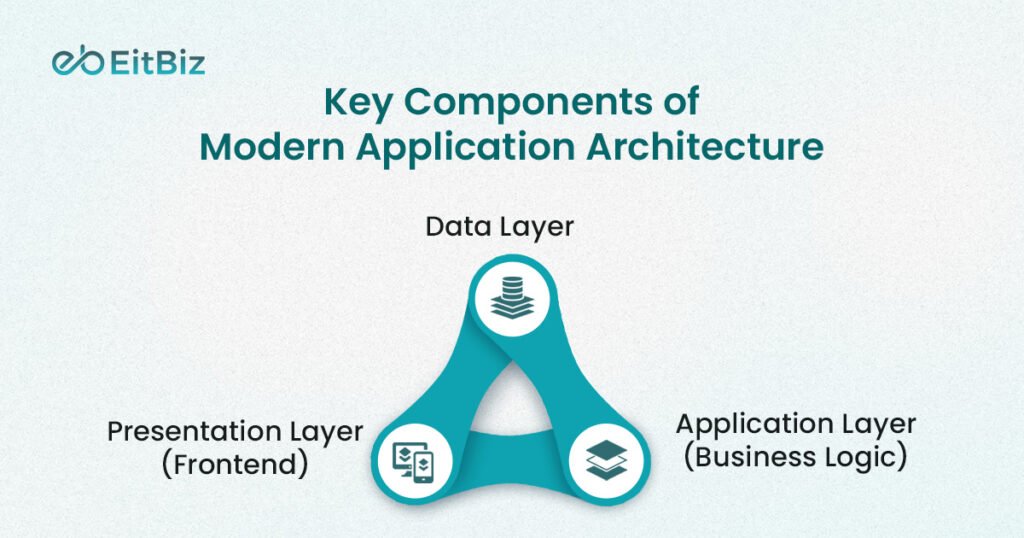
A strong software application architecture is not built randomly. It follows a structured approach where each component has a clear responsibility. When these components work together seamlessly, the result is a scalable, high-performing, and reliable system. Let’s break down the core building blocks of modern application architecture simply and practically.
1. Presentation Layer (Frontend)
The presentation layer is the face of your application. It is everything users see and interact with, such as screens, buttons, animations, and navigation flows.
Developers build this layer using technologies like React Native, Flutter, Swift for iOS, and Kotlin for Android. This layer must stay fast, responsive, and visually consistent across devices.
A well-designed frontend directly impacts user engagement. Even a powerful backend cannot compensate for a slow or confusing interface.
This layer plays a critical role in both iOS and Android application architectures, where performance and a smooth user experience are top priorities.
2. Application Layer (Business Logic)
The application layer acts as the brain of the app. It processes user inputs and applies business rules to deliver the expected output.
For example, when a user places an order in an e-commerce app, this layer handles pricing, discounts, and order validation.
It performs three key functions:
- Manages workflows across the app
- Maintains application state
- Connects the frontend with backend services
A clean and well-structured business logic layer improves maintainability and reduces bugs.
3. Data Layer
The data layer manages how data is stored, retrieved, and updated. It ensures that the right data reaches the right place at the right time.
This includes:
- Local storage like SQLite or Realm for offline access
- Remote databases such as Firebase or PostgreSQL
- Caching mechanisms to improve speed and reduce server load
Efficient data handling is essential for performance. Poor data management can slow down even the best-designed apps.

4. Backend Services
Backend services power everything behind the scenes. Users don’t see them, but they are critical for functionality.
These services handle:
- User authentication and authorization
- Business operations through APIs
- Data processing and server-side logic
A strong backend ensures reliability, especially when your app scales to thousands or millions of users.
5. API Layer
The API layer acts as the communication bridge between the frontend and backend. It allows different parts of the application to talk to each other.
Common API types include:
- RESTful APIs for standard communication
- GraphQL for flexible data queries
- WebSockets for real-time updates
A well-designed API layer improves performance and reduces unnecessary data transfer.
6. Infrastructure Layer
The infrastructure layer supports the entire application. It handles deployment, scaling, and system availability.
This layer includes:
- Cloud platforms like AWS, Azure, and Google Cloud
- CI/CD pipelines for automated deployment
- Containerization tools like Docker for consistent environments
Modern infrastructure enables apps to scale automatically and handle traffic spikes without downtime.
Monolithic vs Microservices Architecture: Key Differences
One of the most critical decisions in application architecture patterns is choosing between a monolithic and a microservices approach. This choice directly affects how your application scales, how fast your team can release updates, and how easy it is to maintain the system over time.
Let’s break both approaches down in a practical, easy-to-understand way.
Monolithic Architectures
Let’s first understand what is monolithic architecture.
A monolithic application is built as a single, unified system. All components, user interface, business logic, and database are tightly connected and run as one codebase. Developers build, test, and deploy the entire application as a single unit.
This approach works well in the early stages of mobile application development, especially when speed and simplicity matter more than scalability.
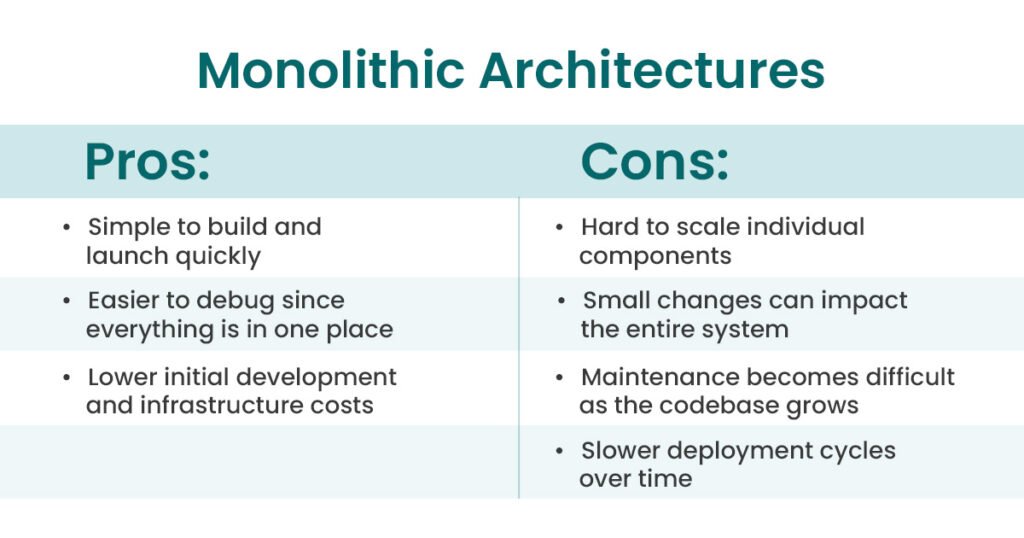
This tightly coupled structure is what defines monolithic architectures. While they are efficient for small applications, they often become restrictive as user demand increases.
Microservices Architecture
Now let’s answer: what is microservices architecture?
In microservices architecture, developers break the application into smaller, independent services. Each service focuses on a specific function, such as user authentication, payments, or notifications and runs independently.
These services communicate with each other through APIs, making the system more flexible and modular.
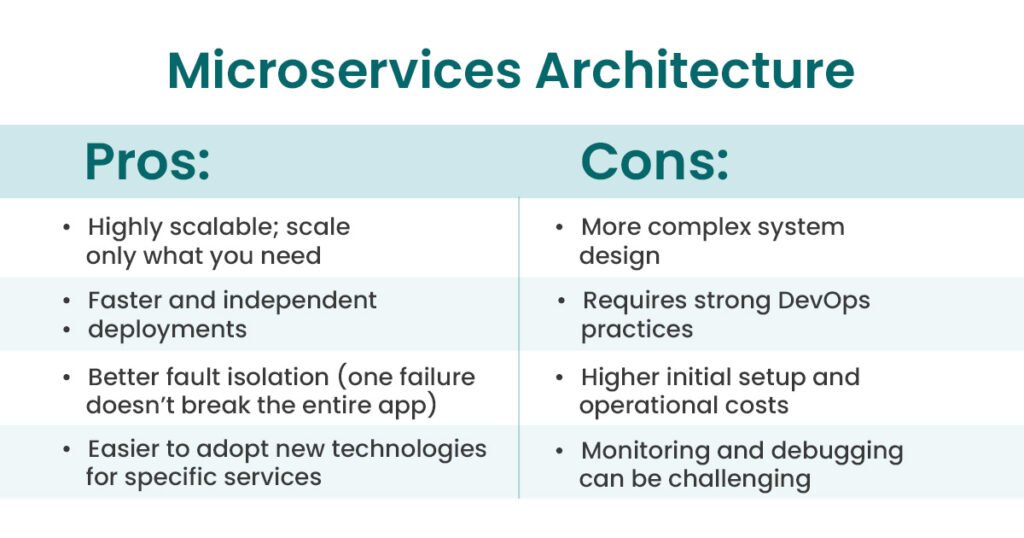
Microservices vs Monolithic Architecture
When comparing microservices vs monolithic architecture, here’s a clear and practical breakdown:
| Feature | Monolithic Architecture | Microservices Architecture |
|---|---|---|
| Scalability | Limited, scales as a whole | High, scales individual services |
| Development Speed | Fast initially | Faster in the long term |
| Maintenance | Becomes complex as codebase grows | Easier due to modular structure |
| Deployment | Full application redeployment required | Independent deployments per service |
| Flexibility | Low flexibility | High flexibility |
| Technology Stack | Usually a single stack | Multiple stacks can be used |
| Fault Isolation | One failure can affect entire system | Failures isolated to specific services |
For startups, monolithic works well. For scaling apps, microservices often win.
Popular Architecture Patterns for Mobile App Development
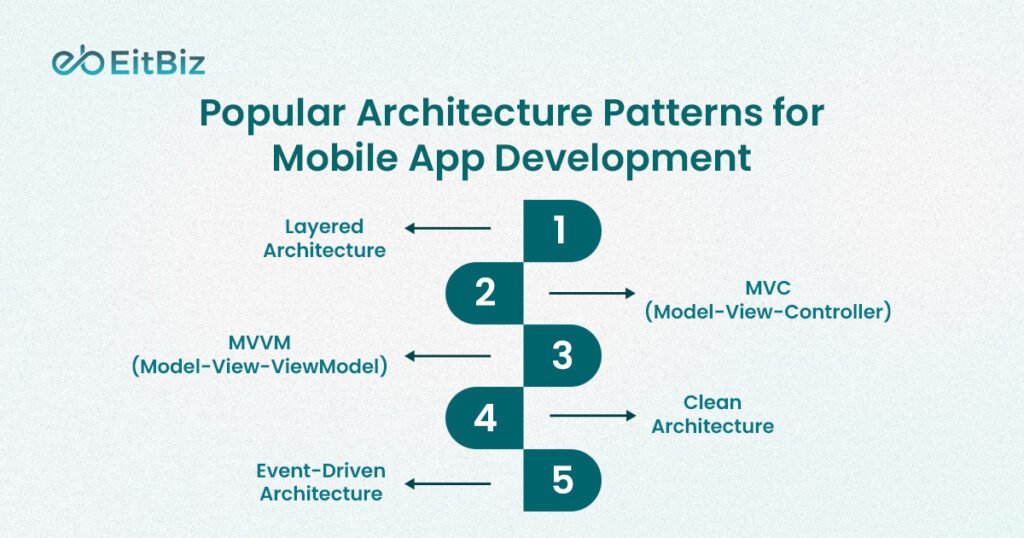
There’s no one-size-fits-all approach. Different application architecture patterns serve different needs.
1. Layered Architecture
One of the most common patterns of enterprise application architecture.
- Divides app into layers (UI, business, data)
- Easy to understand
- Good for structured applications
2. MVC (Model-View-Controller)
Widely used in iOS mobile application development.
- Separates logic from UI
- Improves maintainability
3. MVVM (Model-View-ViewModel)
Popular in android application architecture.
- Better data binding
- Improved testability
4. Clean Architecture
Focuses on independence and testability.
- Business logic is isolated
- Framework-agnostic
5. Event-Driven Architecture
Used in real-time apps.
- Components communicate via events
- Great for scalability
Cloud-Native Application Architecture Explained
Let’s talk about cloud native application architecture, one of the most important foundations of modern, scalable systems.
At its core, this approach means building applications specifically to run in cloud environments rather than adapting traditional systems later. Developers design these applications to fully leverage cloud capabilities like scalability, flexibility, and distributed computing from day one.
Instead of relying on fixed infrastructure, cloud-native systems dynamically adjust to user demand. This makes them ideal for modern mobile application development, where traffic can spike unpredictably.
Key Characteristics of Cloud-Native Architecture
Cloud-native applications follow a few core principles that make them powerful and reliable:
Containerization (Docker)
Developers package applications and their dependencies into containers. This ensures consistency across development, testing, and production environments.
Orchestration (Kubernetes)
Tools like Kubernetes manage containers at scale. They handle deployment, scaling, and system health automatically.
Scalability on Demand
The system can scale up or down based on traffic. For example, an e-commerce app can handle thousands of users during a sale without crashing.
Resilience to Failures
Cloud-native systems are designed to recover quickly. If one component fails, others continue running, ensuring minimal downtime.
Why Cloud-Native Architecture Matters
Cloud-native architecture is not just a trend, it directly impacts performance, cost, and speed of development.
Supports microservices architecture
Cloud environments make it easier to deploy and manage independent services. Each service can scale and update without affecting others.
Enables faster deployment
With CI/CD pipelines and automation, teams can release updates frequently and reliably.
Reduces infrastructure costs
You only pay for what you use. Auto-scaling prevents over-provisioning and reduces waste.
How to Design a Scalable Mobile App Architecture?
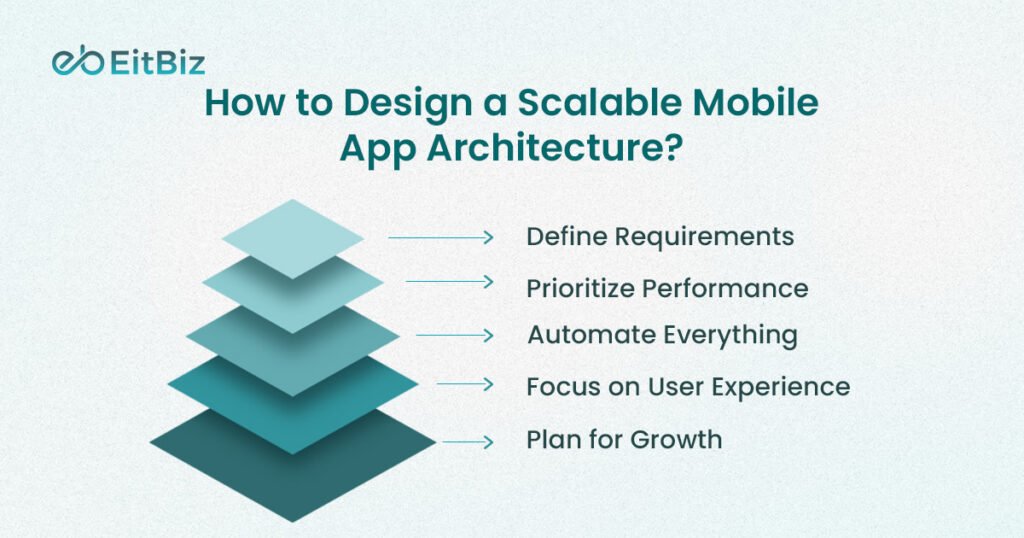
Designing a scalable system is not about guesswork. It requires structured thinking and deliberate planning. A well-designed mobile application architecture ensures your app performs consistently, even as user demand grows over time. Below is a practical step-by-step approach, with each step explained clearly and supported by actionable points.
Step 1: Define Requirements
Before writing a single line of code, you need a clear understanding of what your application must achieve. This step sets the foundation for every architectural decision that follows. Without defined requirements, teams often build systems that fail under real-world conditions.
Focus on these key areas:
- User load expectations: Estimate current users and future growth, including peak traffic scenarios
- Features roadmap: Identify core features now and planned enhancements later
- Performance goals: Define acceptable load times, response speed, and uptime targets
Step 2: Choose the Right Architecture
Once requirements are clear, the next step is selecting the right architectural style. This decision should align with your app’s size, complexity, and expected growth. Choosing the wrong structure early can limit scalability and increase future costs.
Here’s how to approach it:
- Small app < Monolithic architecture – Faster to build and easier to manage initially
- Large or scaling app < Microservices architecture – Better flexibility and scalability
- Plan for evolution – Even if you start small, design with future scaling in mind
Step 3: Optimize Data Flow
Efficient data flow is critical for performance. If your app struggles to retrieve or process data quickly, users will experience delays, regardless of how good your UI looks.
To improve data efficiency:
- Use caching: Store frequently accessed data to reduce repeated processing
- Reduce API calls: Combine or optimize requests to minimize network load
- Optimize database queries: Ensure fast and efficient data retrieval
Step 4: Use Scalable Infrastructure
Infrastructure plays a major role in how your app handles growth. Traditional systems often fail under high traffic, while modern cloud-based systems adapt dynamically.
Build a strong infrastructure with:
- Cloud platforms: Enable flexible resource allocation
- Load balancing: Distribute traffic evenly across servers
- Auto-scaling: Automatically increase or decrease resources based on demand
Step 5: Ensure Security
As your application scales, so does the amount of data it handles. This makes security a critical part of your architecture. A secure system protects user data and maintains trust.
Focus on these essentials:
- Data encryption: Protect sensitive information during storage and transmission
- Secure APIs: Prevent unauthorized access and data leaks
- Authentication systems: Verify users and control access effectively
Best Practices for Modern Application Architecture
Building a strong modern application architecture is not just about choosing the right tools; it’s about following proven practices that keep your system scalable, efficient, and easy to maintain. These best practices help teams avoid common pitfalls and build applications that perform well in real-world conditions. Let’s break them down in a practical and actionable way.
1. Keep It Modular
A modular approach is at the heart of scalable architecture. Instead of building one large, tightly connected system, divide your application into smaller, independent components.
This makes your app easier to update, test, and scale. If one module needs changes, you don’t have to touch the entire system.
Key actions:
- Break features into independent components
- Reduce dependencies between modules
- Design services with single responsibilities
2. Prioritize Performance
Performance directly impacts user retention. Even a slight delay can cause users to abandon your app. That’s why performance should be a priority from the beginning—not something you fix later.
You can improve performance by:
- Lazy loading: Load only what is needed, when it is needed
- Efficient API calls: Minimize unnecessary data transfer
- Background processing: Handle heavy tasks without blocking the user interface
3. Automate Everything
Manual processes slow down development and increase the risk of errors. Automation ensures consistency, speed, and reliability across your development lifecycle.
Focus on:
- CI/CD pipelines: Automate build, testing, and deployment processes
- Automated testing: Catch bugs early and maintain code quality
Automation allows teams to release updates faster and with more confidence.

4. Focus on User Experience
Architecture is not just a backend concern, it directly affects how users experience your app. A poorly structured system can lead to slow load times, laggy interactions, and crashes.
To support a smooth user experience:
- Ensure fast response times
- Optimize rendering and data handling
- Maintain consistency across devices and platforms
Your architecture should always support a fast, stable, and intuitive interface.
5. Plan for Growth
One of the biggest mistakes teams make is designing for the present and ignoring the future. A good architecture anticipates growth and adapts easily as demand increases.
Plan ahead by:
- Designing systems that can scale horizontally
- Avoiding hardcoded limitations
- Preparing for increased data and user load
How to Choose the Right Mobile Application Architecture?
Choosing the right mobile application architecture is a strategic decision. It directly affects your app’s performance, scalability, development speed, and long-term maintenance. There is no one-size-fits-all solution; the right choice depends on your business goals, technical requirements, and future growth plans.
Instead of following trends, focus on what your application truly needs. Here are the key factors you should evaluate before making a decision.
1. App Size
The size and complexity of your application play a major role in determining the architecture.
- Small apps < Monolithic architecture
Ideal for simple applications with limited features and users. It allows faster development and easier management.
- Large apps > Microservices architecture
Better suited for complex systems with multiple features, integrations, and high user traffic.
2. Team Expertise
Your development team’s skills and experience should guide your architectural choice. Advanced architectures require strong technical capabilities.
- Microservices require experienced teams
Teams need knowledge of distributed systems, API management, DevOps, and monitoring tools.
- Less experienced teams may find monolithic systems easier to build and maintain initially
3. Budget
Budget constraints often influence architecture decisions, especially in the early stages.
- Monolithic architecture < initial cost
It requires less infrastructure and fewer resources to get started.
- Microservices architecture > initial cost
They involve additional setup, tools, and operational overhead. However, microservices can reduce long-term costs by improving scalability and efficiency.
4. Time to Market
If speed is your priority, architecture plays a crucial role.
- Monolithic architecture < time to market
Since everything is built as a single unit, teams can launch MVPs quickly.
- Microservices may take longer initially due to setup complexity
For startups or early-stage products, faster time to market can be a significant advantage.
5. Scalability Needs
Think about how your app will grow over time. Scalability should never be an afterthought.
- High growth > Microservices architecture
It allows you to scale specific components without affecting the entire system.
- For apps with predictable or limited growth, monolithic architecture can still work effectively
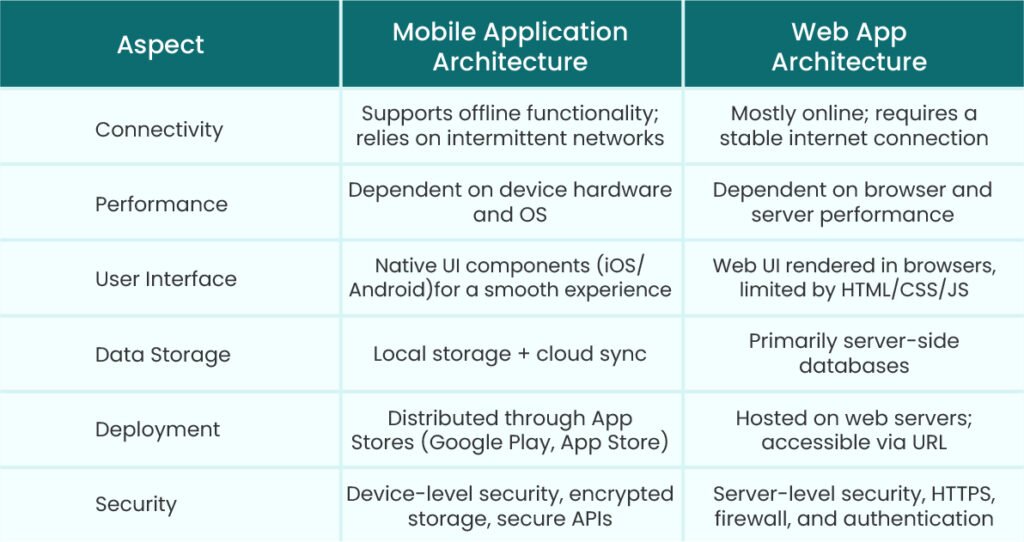
Web App Architecture vs Mobile Architecture
Here’s a clear comparison of web app architecture and mobile application architecture to understand their differences and design considerations:
Role of Android and iOS Architectures
The architecture of a mobile platform defines how apps are structured, how components interact, and how developers can optimize performance. Both Android and iOS have unique architectural patterns and considerations that impact Android application development and iOS application development. Understanding their roles is crucial for building high-performing, scalable apps.
Android Application Architecture
Android apps follow structured architectural patterns to manage complexity and ensure maintainability. Key aspects include:
- Uses MVVM and Clean Architecture: These patterns separate concerns, making apps easier to test, maintain, and scale. MVVM simplifies UI management, while Clean Architecture isolates business logic from the framework.
- Focus on lifecycle management: Android apps must handle activity and fragment lifecycles to manage resources efficiently and avoid memory leaks.
- Strong integration with Google services: Android apps can leverage services like Firebase, Google Maps, and Google Cloud, enabling features like analytics, notifications, and cloud storage.
By following these practices, developers can build robust Android apps that handle complex workflows and provide a smooth user experience.
iOS Application Architecture
iOS applications also follow well-defined architectural patterns to ensure high performance and seamless user experience:
- Uses MVC and MVVM: MVC separates data, UI, and control logic, while MVVM provides better testability and data binding.
- Emphasis on performance and design: iOS architecture prioritizes fluid animations, smooth transitions, and optimized memory usage to deliver a premium experience.
- Strong ecosystem control: iOS apps operate within Apple’s tightly controlled ecosystem, which ensures security, consistency, and integration with Apple services like iCloud, Siri, and Apple Pay.
Both Android and iOS architectures play a critical role in delivering android application and iOS application, allowing developers to create apps that are scalable, maintainable, and performant across devices.
Enterprise Perspective on Application Architecture
In enterprise mobile app development, architecture becomes even more critical. Large-scale enterprise applications must manage complex workflows, handle millions of users, and integrate with multiple third-party systems, making robust architecture essential.
Why enterprise architecture matters:
- Large user base: Enterprise apps often serve thousands or millions of users across different regions.
- Complex workflows: Enterprise systems include business rules, approval chains, and multi-step processes that must run smoothly.
- Multiple integrations: Enterprises rely on integrations with ERP systems, CRM platforms, cloud services, and APIs.
To meet these challenges, enterprises often adopt:
- Microservices: Independent services make scaling, updating, and fault isolation easier.
- Cloud-native systems: Cloud platforms provide flexible infrastructure, auto-scaling, and high availability.
- Advanced security layers: Data encryption, secure APIs, and role-based access control ensure compliance and protect sensitive information.
Adopting these practices ensures that enterprise applications remain scalable, reliable, and compliant, supporting both business needs and user expectations.
Final Thoughts
Designing a successful mobile application goes far beyond creating attractive screens or flashy features. The foundation lies in modern application architecture, a well-planned system that balances performance, scalability, security, and maintainability. From understanding monolithic vs microservices architecture to leveraging cloud-native systems, following best practices ensures your app can grow seamlessly while delivering a smooth, reliable user experience.
Whether you are developing for Android, iOS, or building enterprise-grade solutions, the right architecture allows your team to innovate faster, handle growing user loads, and stay ahead of the competition. Planning for growth, optimizing data flow, and prioritizing modular design are not just technical decisions; they are business decisions that directly impact your app’s success.
If you’re ready to build high-performing, scalable mobile applications that users love, EitBiz is here to help. With expertise in Android application development services, iOS mobile application development, and enterprise solutions, we guide you from architecture planning to deployment, ensuring your app is future-ready.